

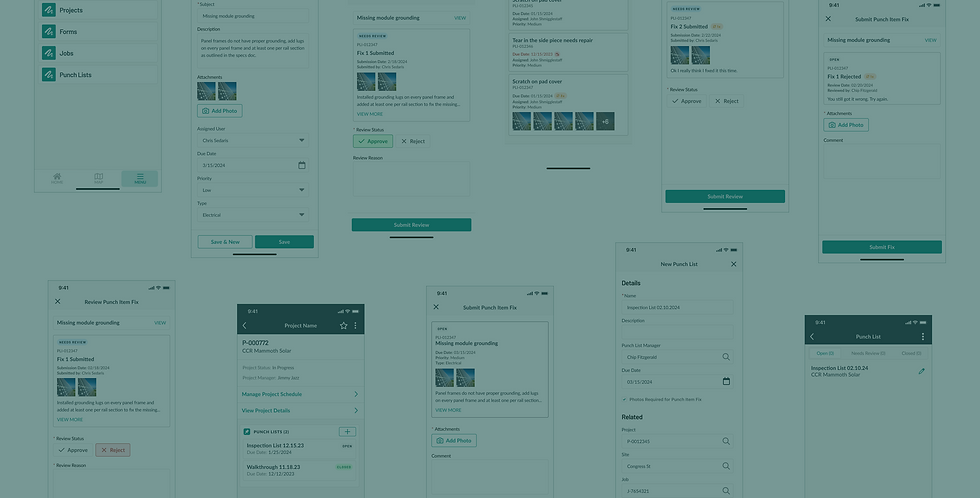
Punch List
Sitetracker
Overview
Punch List
Punch List gives field crews and construction managers a shared mobile and desktop workflow to track, resolve and close out job-site issues across millions of sites and assets.
How it works
Construction managers assign tasks to field workers by trade who then submit fixes and questions to get real-time feedback. Permissions are built in so only the right people can view or sign off on an item.
My Role
Product Designer, acting PM. Owned design direction end-to-end and led the beta program with customers and implementation teams.
Current State
Before Punch List, gaps between the field and office put project timelines and budgets at risk:
-
Fragmented tools: Calls, texts and spreadsheets never built for this type of coordination
-
No fix confirmation: No consistent way to verify a fix was done right before a contractor left the site
-
Remote sites: Often spotty service or none at all, isolating field crews
-
Scale: A single project could involve hundreds of items and dozens of contractors at once
Problem to Solve
How can Sitetracker close the loop between the field and office so an unanswered question or a rejected fix doesn't cost a project days or weeks of delay which prevents closeout and payment?
Project Goals
Goal #1
Close the loop between field and office so an unresolved issue or rejected fix doesn't delay a project's closeout and payment.
Challenge + Response
-
No shared, real-time way to track issues at scale: hundreds of items, dozens of contractors, per project.
-
Designed one system connecting assignment, fix and review, with permissions controlling who could see or act.
Goal #2
Increase retention and new customer sales with construction management tools that outpace competitors.
Challenge + Response
-
Competitors were more connected, and Salesforce's configurability meant no two customer environments worked alike.
-
Surpassed competitors by using data our customers already had in Salesforce, and designed for variability by default.
Goal #1
Deliver a workflow that our highest-value Sitetracker customers had been requesting.
Challenge + Response
-
Limited direct access to field crews for research and testing.
-
Leveraged research from other product teams and built a strong beta group to gather feedback beyond direct field access.
Align & Research
1
Align & Research
User Personas

Construction Manager
Oversees project execution in the field, relying on Punch List to assign, track and resolve issues quickly and keep projects on schedule.

Field Crew
Uses Punch List to receive and complete assigned tasks on-site, resolving issues faster and keeping construction managers clearly informed.
Generative & SME Interviews
-
What is the current process for our users? Where are the pain points and gaps?
-
How do our customers complete a complex construction management workflow across personas?
-
What is the value of a connected Punch List workflow inside Sitetracker?
-
What metrics are important to the customer and how can we impact them?
Synthesis & Prioritization
I synthesized research across 10+ themes spanning permissions, communication, field conditions and workflow integration. Then I worked with engineering and product to weigh customer impact against technical cost and decide where to focus next.

Affinity mapping across customer interviews

Rigorous prioritization: user value vs level of effort
User Insights
Communication & Approvals
Insight
-
Emails and texts couldn't track issue status or history, and slow back-and-forth cost time and money.
Decision
-
Introduced the activity timeline and approval flow shown in Testing Round 2.
Field Conditions
Insight
-
Mobile usage was historically low and field conditions were demanding: weather, equipment safety hazards, unreliable service.
Decision
-
Prioritized quick capture and offline access, designed for harsh conditions.
Connected Workflow
Insight
-
Customers wanted Punch List to integrate with tools they already relied on, not add another disconnected piece to their process.
Decision
-
Built a connected suite instead of one isolated feature.
Personas & Permissions
Insight
-
Access needed to match real-world roles, not Salesforce user types, so each persona saw only what applied to them.
Decision
-
Designed the item-level permission model, more granular than any existing platform feature.
Ideate & Prototype
2
Ideate & Prototype
Competitive Analysis
I audited direct competitors Procore, GoCanvas, Pathwave, Autodesk and more, alongside tools like Excel, Smartsheet and Airtable, which customers were stretching to do a job they weren't built for. One EV charging network I interviewed was running punch lists across 6 countries with 6 different spreadsheet formats before switching to Sitetracker.
I also looked at comparative products solving similar interaction problems, like Typeform's approach to form building, to understand best practices for how users might expect our product to work.


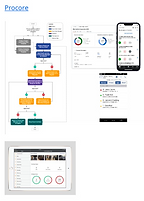
Customer workarounds before Punch List
Architecture
Question
Should Punch List extend Forms, an existing feature used widely across the platform, or become its own tool?
Recommendation
Build Punch List on its own, research showed the use cases were fundamentally different.
Why
Forms was built for predictable, repeatable processes like scheduled maintenance checks. Punch work needed site-specific inputs, and permissions and item-level approval that Forms didn't support.
Impact
Saved the team from the technical debt of building onto Forms, and protected existing users from disruption.
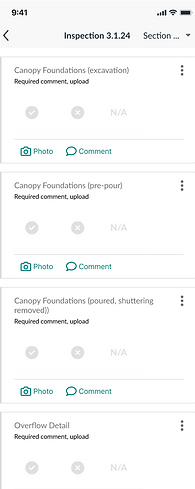
Forms mobile

Punch List mobile
User Journey
I mapped the full lifecycle of a Punch Item (the individual issue tracked within a Punch List), clarifying what each persona was responsible for at each stage and where the workflow connected to other Sitetracker features.
Mobile and web called for distinct priorities: the field needed quick capture and offline access, while the office required deeper data views. Also, contractors needed an alert when work was assigned to them, while managers cared more about a queued view, not a ping for every single fix.
Open
Manager creates the item


Open → Needs Review
Contractor or Crew submits the fix for approval

Needs Review → Closed
Manager reviews and approves, closing the loop
Prototype
I included engineering from the start of the project, so by the time we reached specific components, screens and actions, we were already working through where user needs and technical constraints didn't currently align. Tight feedback loops kept us out of designing and building in silos, which would have caused bigger problems later.
Wireframes, and the designs that followed, went through regular stakeholder reviews and design critiques, surfacing edge cases and user flow questions before the team spent time on the wrong ideas.
Mobile and web progressed together, I designed them together while engineering built them concurrently, keeping two tracks moving at once.


Design System
Punch List relied heavily on photo documentation. When one of the other 10 scrum teams modified the shared component without cross-team approval, photo functionality failed across the app, Punch List included.
Response
I created and led the governance process: a design decision tree for evaluating component changes, plus a weekly review cadence with design and engineering reps from every team to catch risks before anything shipped, known as Mobile Monday and Web Wednesday.
Components
Punch List combined out-of-the-box Salesforce Lightning components with new components built specifically for it on both web and mobile.
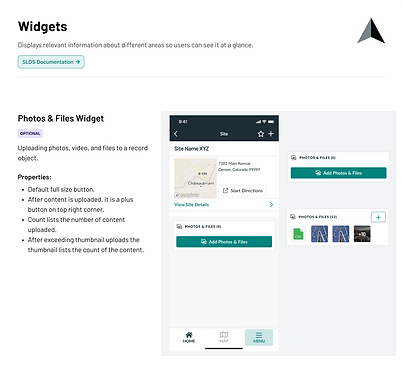
Component documentation -
part of the governance process


Sitetracker custom component variables

OOTB
Test & Iterate
3
Test & Iterate
Testing Round 1
Punch Item Approval Flow
Testing this out-of-the-box Salesforce web page revealed 2 problems:
-
Only 1 response was visible at a time
-
Engineers confirmed Approve/Reject couldn't function within this layout
A custom view solved both.
(shown here on mobile)


Testing Round 2
Punch Item History
Testing the Punch Item lifecycle surfaced a new user need:
-
Office staff wanted the full history of a Punch Item, to understand why it has 5 fix attempts, or see who approved/rejected it
A fix count and an activity timeline showed the item history at a glance.


AI-assisted Photo Verification
AI would check every photo on a Punch Item fix:
-
Flag if unclear or mismatched, prompting a retake on-site
-
Note for reviewer if the photo's location didn’t match the job site
Why it matters
Catching a bad photo on-site meant the company could avoid paying for another visit.
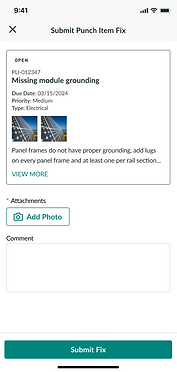


Capture → Upload → Flag: prompt to retake photo

*Concept explored with engineering
Launch & Measure
4
Launch & Measure
Results
Every customer in our recruited beta group installed Punch List into their live Salesforce org.
My role
I worked closely with the implementation and customer support teams to incorporate Punch List into each customer's existing workflow. I also led interviews and usability testing throughout the beta, refining the experience before rolling it out more broadly.
Impact
The release of Punch List contributed directly to customers signing or expanding with Sitetracker over competing products. While running the beta, our previous research was shaping what to build next: RFIs, Submittals and a Forms redesign.
Punch Items list view


Punch List on a Project
Connected Workflows
5
Connected Workflows
Each tool in Sitetracker's construction management suite is its own object in Salesforce, but by design they share the approval, permissions and tracking patterns I created for Punch List, making adoption easy for users.
RFIs
A Request For Information (RFI) turns a question about scope or specs into 1 official answer, using the same assignment and approval logic as Punch List.
Submittals
Submittals applies a tracked approval flow to formal document sign-off, closing the loop on paperwork the way Punch List does for physical fixes.
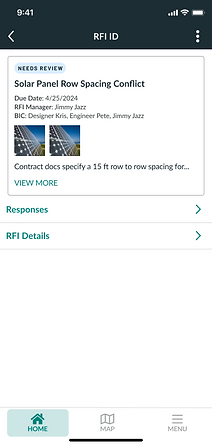

View RFI and history of responses
Forms
Forms already powered inspections and checklists across the platform, but it needed rethinking to work well for field users and connect directly to Punch List.
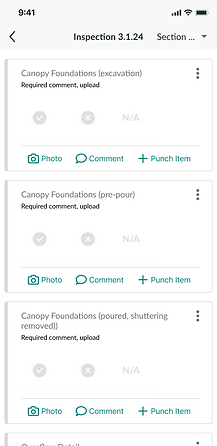
On Forms, a failed inspection item becomes a Punch Item with one tap, the direct bridge between the two tools.

The redesigned form items show completion status to field users, like how many required photos are done, so they know what’s left.
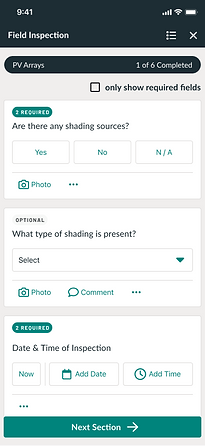
In the new Forms navigation, users can move between sections and see their overall completion status.